Introducing Universal Prompt Language - UPL
Writing prompts for AI has become an increasing daily task, not only for developers but for anyone using LLMs to get answers. We write prompts over and over to get similar replies…
Three main problems arise:
- We write the same prompt with slightly different data, so we copy/paste
- We need different prompt text areas depending on the context, so we copy/paste
- We write prompts that worked but we lost track of them, so we rewrite them
What if there was a way to solve those problems at once, saving us not only tons of hours of writing but also standardizing our prompts and obtain quality responses every time?

A standard language to define dynamic prompts
Here I present you Universal Prompt Language (UPL), a language designed to create dynamic powerful prompts. The idea is to be able to inject data into them, producing a prompt for each use case, while maintaining our rules for the prompt.
UPL supports:
- variables
- loops
- conditionals
The idea is to define a generic prompt and build a prompt filling in the variables which end up creating your final prompt. Once the prompt is created you can use it while the UPL prompt remains there for future use, with different variables.
Here is an example of an UPL prompt that creates a prompt that asks the llm for a debate outline based on different aspects of the debate:
--
name: ask_debate_outline
title: Ask for a Philosophical Debate Outline
desc: Ask the assistant to outline a debate from a list of positions
params:
  positions:
    type: list
    desc: List of positions to include in the debate
    etype: object
    ofields:
      stance:
        type: option_single
        desc: Whether the position is for or against
        opts:
          - "for"
          - "against"
          - "neutral"
        def: "for"
      claim:
        type: string
        desc: The claim being argued
        def: "free will exists"
      reasoning:
        type: long_string
        desc: Supporting reasoning (if any)
        def: "none"
      sources:
        type: object
        desc: Source attribution
        ofields:
          author:
            type: string
            def: "anonymous"
          year:
            type: string
            def: "unknown"
        def: {}
  include_counterpoints:
    type: boolean
    desc: Whether counterpoints should be requested for each position
    def: true
--
Please write a debate outline covering the following positions:

{{{for POSITION in POSITIONS}}}
- [[[POSITION.STANCE]]] [[[POSITION.CLAIM]]] (reasoning: [[[POSITION.REASONING]]])
{{{if INCLUDE_COUNTERPOINTS}}}
  Note: provide a counterpoint to this position.
{{{end if}}}
{{{if POSITION.REASONING != "none"}}}
  Note: this position includes explicit reasoning.
{{{end if}}}
{{{end for}}}

Explain how each position relates to the central question.
--
The UPL cli
The upl cli is a terminal command (Windows, Macos and Linux compatible) that allows you to Create, Edit, Build and Store the UPL prompts easily from your terminal. It includes:
- Prompts browser (with tag support)
- Prompts builder
- Prompts editor
- Manage a UPL prompts repository
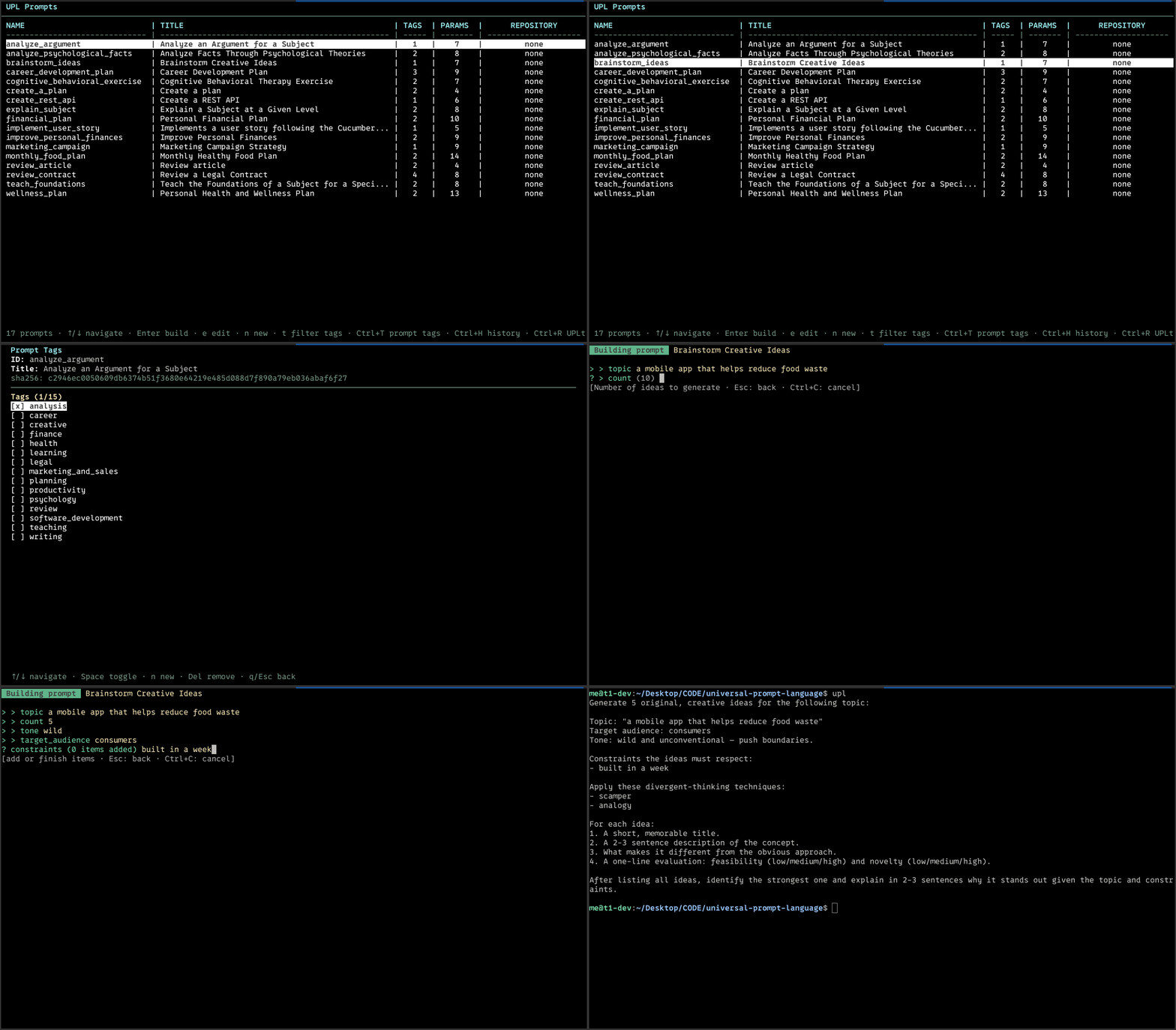
There are two ways to build a prompt using the cli:
- interactively (filling each variable manually)
- from a json file containing the variables (useful to make the LLM generate it)
Here are some examples of json inputs (filled in variables).
Once the prompt has been built using the cli, it will appear in screen. Thanks to the unix pipes, you can send the prompt automatically via pipe, and get the LLM response right away, example:
upl build create_plan | aichat
Install upl cli and start using Universal Prompt Language.
Creating useful UPL prompts
To create an useful UPL prompt you have to think slightly different than when you write a specific prompt for a particular query.
Think on a repetitive task that you need assistance with constantly, but everytime with different context, examples:
The most interesting aspect is that the upl prompts can be also generated with AI.
If you are using an agent you can install the upl-prompt-skills which can be used by your agent to write a good upl prompt based on your needs.